Product label scanner
Scan product labels into a spreadsheet.
Photograph packaging, stock and spare-part labels with your phone. TagQuill reads the printed details into rows you can check and download as CSV or Excel.
50 free credits · No card needed · No app to install
What it reads from the label
Label OCR reads the printed text in your photo. Each detail goes into its own field, which you can edit.
- Product and manufacturer
- The printed product name and brand.
- Model and part number
- Kept in separate fields, exactly as printed.
- Serial number
- When the label has one. Left blank when it doesn't.
- Printed specifications
- Size, power rating and any other printed details.
A real product label and its row
The photo, the fields we recorded from it, and the same row as CSV and Excel files.
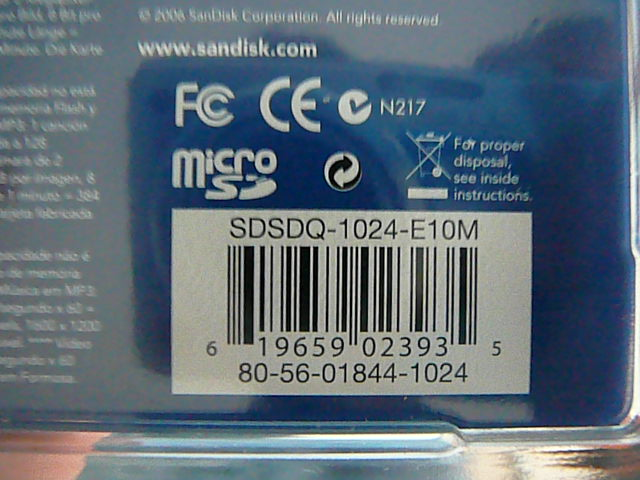
Photo source: Photo: ZXing test collection · Apache 2.0.

A real product package, ready for a spreadsheet
- Product
- microSD
- Manufacturer
- SanDisk Corporation
- Printed product code
- SDSDQ-1024-E10M
- Additional printed code
- 80-56-01844-1024
- Printed UPC
- 619659023935
- Part number / serial number
- Not labelled in this view; left blank
How it works
Connect your phone
On your computer, choose Scan with phone and scan the QR code. The camera opens in your phone's browser. Nothing to install.
Photograph the label
Keep the text sharp and in frame. You can also upload JPG, PNG or WebP photos you already have.
Check and download
Compare each field with the photo and fix anything misread. Pick your columns and download CSV or Excel.
Questions
Does it look products up from the barcode?
No. It reads the text printed on the label. It doesn't search a product database or add details that aren't in the photo.
Can I match my existing spreadsheet?
Yes. Choose, rename and reorder columns, or import headings from a CSV. Save the layout for next time. TagQuill exports files; it doesn't sync with Excel or Google Sheets.
Does it track stock quantities?
No. It records what the label says. Add counts and shelf locations in your spreadsheet.