Equipment nameplate scanner
Scan equipment nameplates into a spreadsheet.
Build an equipment list from the plates on your machines. Photograph each nameplate and TagQuill records the maker, model, serial number and ratings, ready to download as CSV or Excel.
50 free credits · No card needed · No app to install
What it reads from the plate
Nameplate OCR reads the printed text in your photo, for equipment registers, maintenance handovers or resale listings. Model and serial numbers stay in separate fields.
- Manufacturer and model
- The maker and model printed on the plate.
- Serial and part numbers
- Each in its own field, exactly as printed.
- Electrical ratings
- Voltage, current, frequency and power, when printed.
- Other specifications
- Speed, dimensions, equipment type and other printed details.
A real motor nameplate and its row
The photo, the fields we recorded from it, and the same row as CSV and Excel files.
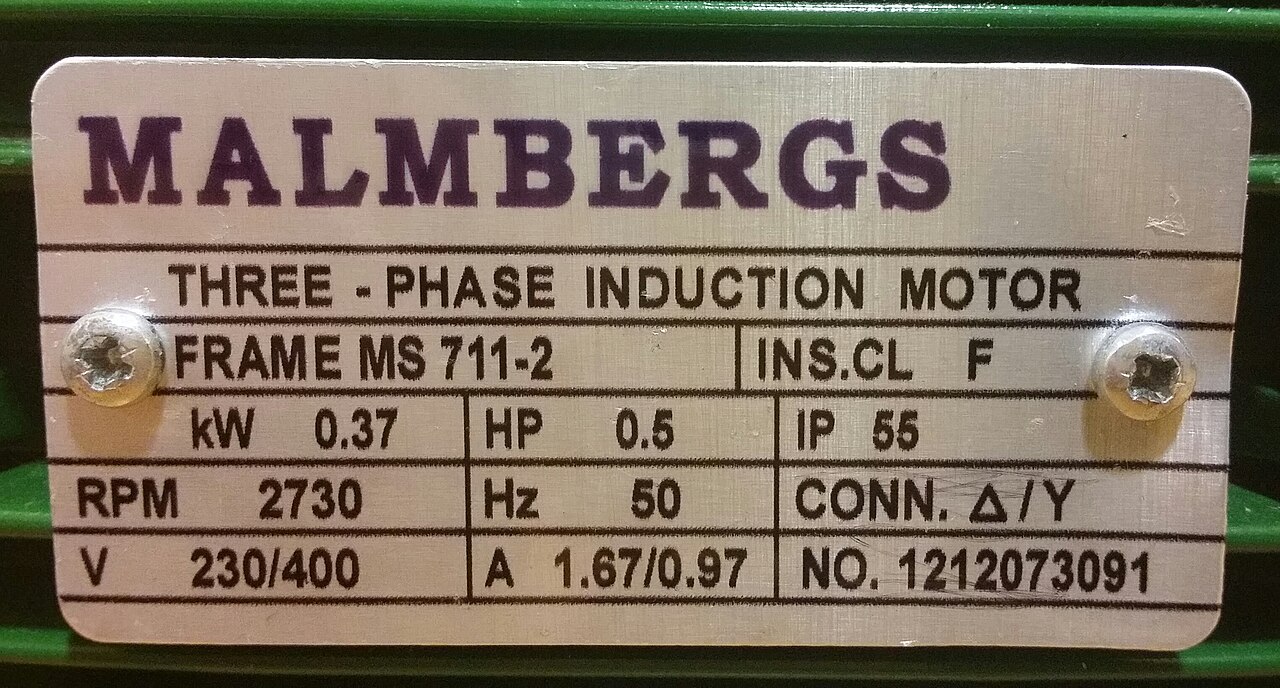
Photo source: Photo: TagQuill’s existing public motor demo.
A motor nameplate, with the details kept separate
- Manufacturer
- MALMBERGS
- Equipment
- Three-phase induction motor
- Frame
- MS 711-2
- Printed NO. (serial field)
- 1212073091
- Power
- 0.37 kW / 0.5 HP
- Voltage / current
- 230/400 V / 1.67/0.97 A
- Speed / frequency
- 2730 RPM / 50 Hz
- Protection / insulation
- IP 65 / F
- Connection
- Δ/Y
- Part number
- Not printed; left blank
How it works
Connect your phone
On your computer, choose Scan with phone and scan the QR code. Allow camera access in your phone's browser.
Photograph the whole plate
Get every line of text in frame. On shiny metal, change the angle to avoid glare. Existing JPG, PNG or WebP photos work too.
Check and download
Compare each field with the photo, fix anything misread, pick your columns and download CSV or Excel for your asset list.
Questions
Can it read motor nameplates?
Yes, if the text is legible in the photo. Glare, worn stamping or tiny print may need a second photo or a manual fix.
Does it look up specifications online?
No. It records what's printed on the plate. It doesn't check manufacturer, warranty or equipment databases.
Can I import the records into my asset system?
Yes, as a file. Download CSV or Excel and map the columns to your system's import. TagQuill doesn't sync directly with maintenance or asset software.