Capture & review
Serial number scanner: capture labels with your phone
Capture printed serial numbers for an inventory export. Compare a real equipment label with its reviewed row and download CSV or Excel examples.
Read the number printed on the item
If your job is to get serial numbers from labels into a spreadsheet, a photo-based scanner can save the copying step. Photograph the text, extract the identifier and check it against the image before export. Keep the product or model number alongside it so the row still makes sense later.
This is different from looking up warranty details or specifications from a serial number. TagQuill extracts visible label text; it does not query a manufacturer's registration database.
| Your task | What you need |
|---|---|
| Read S/N text and nearby label fields | Photo extraction, followed by review |
| Decode a value encoded in bars or a QR symbol | A reader that supports that barcode format |
| Find warranty status from an existing serial | The manufacturer's lookup service |
A real equipment label: model is not serial
Compare the equipment photo with the reviewed fields below. Model, part number and serial number have separate places in the row. If the label does not show a readable serial, leave that field blank rather than copying another identifier into it.
Download the sample workbook or CSV to see the same row outside the website. For matching across different brands, keep manufacturer and serial number together. A repeated serial is a reason to inspect both records, not automatically delete one.
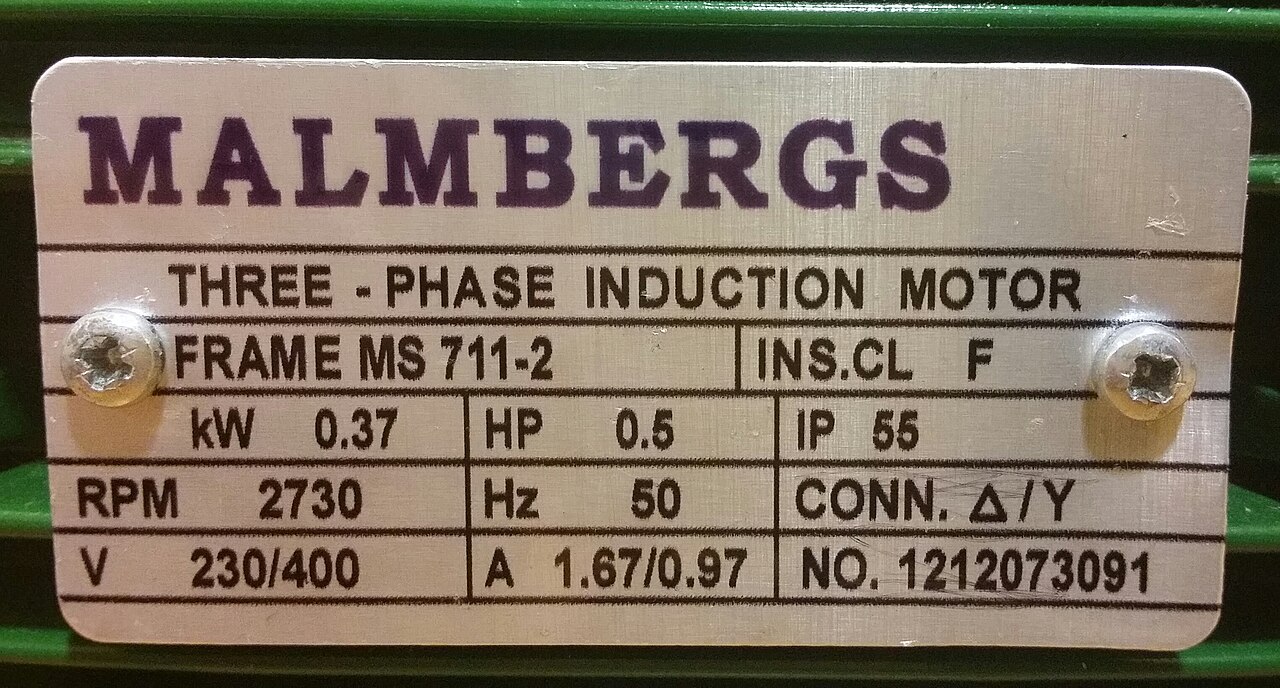
Photo source: Photo: TagQuill’s existing public motor demo.
A motor nameplate, with the details kept separate
- Manufacturer
- MALMBERGS
- Equipment
- Three-phase induction motor
- Frame
- MS 711-2
- Printed NO. (serial field)
- 1212073091
- Power
- 0.37 kW / 0.5 HP
- Voltage / current
- 230/400 V / 1.67/0.97 A
- Speed / frequency
- 2730 RPM / 50 Hz
- Protection / insulation
- IP 65 / F
- Connection
- Δ/Y
- Part number
- Not printed; left blank
Capture a label that you can verify
Include the S/N, Serial or Serial No. heading in the frame, plus the nearby model and manufacturer. A tightly cropped string of digits loses the context that tells you what the number means.
- Open your inventory on the computer and choose Scan with phone. Use your phone to scan the workspace QR code and allow camera access.
- Hold the camera steady and square to the label. Check that glare does not cover any part of the identifier, then take the photo.
- Review the received record next to its source image. Compare every character, especially O and 0, I and 1, and the final digits.
- If a character is obscured, retake the photo. Export the reviewed serial alongside manufacturer, item and model in CSV or Excel.
Keep the identifier intact after capture
Store serial numbers as text, including leading zeros, spaces and hyphens. A spreadsheet that changes 00018427 to 18427 has changed your identifier even if the photo extraction was correct.
Check a few exported rows before a large capture session. If the destination needs different headings, save a custom export layout and reuse it. This produces an importable file; it does not establish an ongoing connection to another inventory system.