Inventory templates
Inventory spreadsheet template for warehouse labels
Download a blank CSV header and a populated label example. Choose useful inventory columns and add verified stock counts and locations in your spreadsheet.
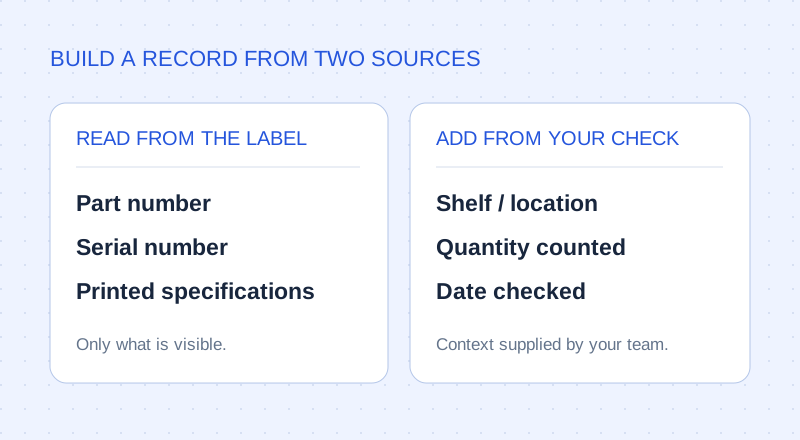
Separate what the label says from what you observe
A clear inventory sheet answers two questions: what is this product, and what do we actually have? Use label photos for the first. Use a physical check for quantity and location. One photo of a box does not establish how many boxes are on the shelf.
| Column | Where it comes from | Rule |
|---|---|---|
| Item | Visible description; review extraction | Describe the product |
| Manufacturer | Printed label | Keep the printed maker |
| Part number | Printed label | Keep as text |
| Serial number | Printed label, if present | Leave blank if absent |
| Specifications | Printed attributes | Keep units alongside values |
| Location | Your physical shelf check | Add separately |
| Quantity | Your physical stock count | Add separately |
| Checked on | Date of your stock check | Add separately |
See a populated label row before choosing your columns
The photo and sample files below show a real product label and its reviewed fields. Use the populated row to inspect the column names and values, then use the blank CSV header to start your own file.
The sample exports contain label-derived information. They do not invent a warehouse location, a counted quantity or a stock-check date. Add those columns and verified values in your working spreadsheet if your team needs them.
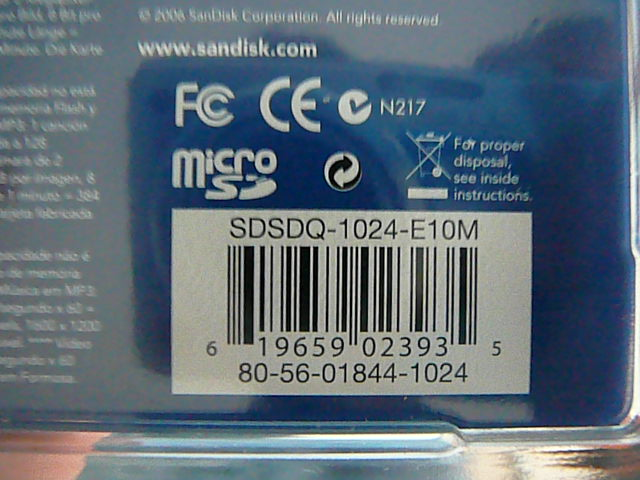
Photo source: Photo: ZXing test collection · Apache 2.0.

A real product package, ready for a spreadsheet
- Product
- microSD
- Manufacturer
- SanDisk Corporation
- Printed product code
- SDSDQ-1024-E10M
- Additional printed code
- 80-56-01844-1024
- Printed UPC
- 619659023935
- Part number / serial number
- Not labelled in this view; left blank
Build the reusable export in TagQuill
Start your own file with the label-derived columns: Item, Manufacturer, Part number, Serial number and Specifications. Use the export builder to map your headings to the extracted fields and save the format. The blank template supplies headings; it does not create location or counting features inside TagQuill.
- Download the blank CSV header template, or use the column headings from your own destination file.
- Import those headings into the export builder and check each field mapping.
- Export a small set of reviewed records and inspect the file in your destination spreadsheet.
- Add location, counted quantity and check date there if needed. Reuse the saved export layout for future photo batches.
Twelve identical boxes: one row or twelve?
For twelve identical products sharing one part number, a stock list can use one product row with a manually counted quantity of 12. For twelve laptops that must be tracked individually, an asset register needs twelve rows with their separate serial numbers. Choose the row meaning before you start; photo count is not stock quantity.
If a destination system expects a particular template, use its required headers and value formats. TagQuill exports files; it does not automatically synchronise stock levels or push records to every warehouse or asset-management application.
Make the next batch fit the first one
Agree on one column order, one rule for identifiers and one way to write locations. Keep units alongside specifications: 230 without V is ambiguous. Review unclear values while the item is still available to photograph again.
Before merging another export, compare the intended matching key. A part number identifies a product type; a serial number can distinguish units. Retain the source photos and resolve uncertain matches before overwriting an existing row.
Blank templates
Label columns, plus empty Location and Quantity columns to fill in after you count the stock.
Only need column headings for the export builder? Download the CSV header.